One or two people hold it all
What the contract requires is understood by whoever read it. Everyone else asks them, waits, or guesses — and when they are on leave, the practice guesses.
For GP practices, PCNs and federations
InBrief reads your service specifications and turns them into answers your whole team can use — with the passage each one came from shown alongside it. No patient data. No clinical advice. Nothing sent without a person approving it.
Half an hour, against a specification you already hold. Twelve-week paid pilots from £500.
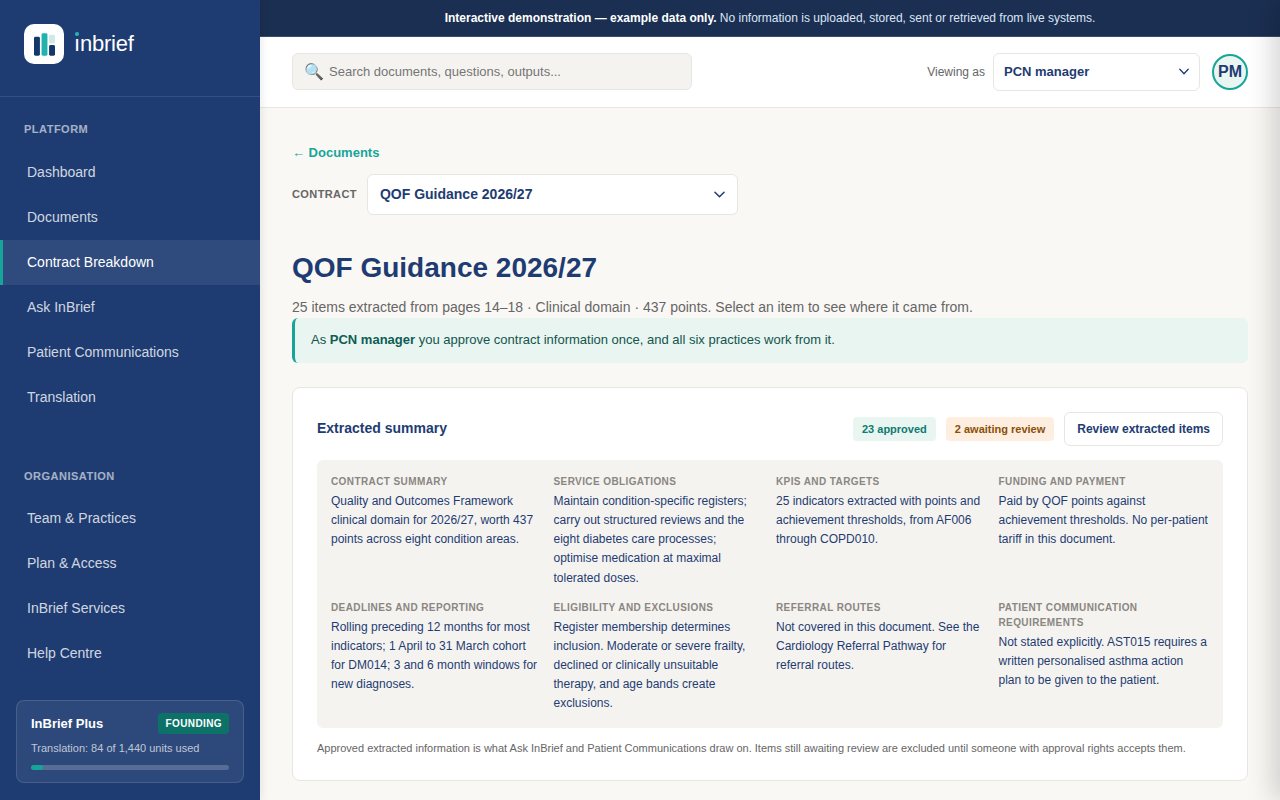
Used by the people who have to read the specification and then make it happen — practice managers, PCN managers, service leads, care coordinators and reception teams.
Dozens of pages. The obligations, the indicators, the deadlines and the payment conditions are spread through all of them — and the people who have to act on them are not the people who read them.
What the contract requires is understood by whoever read it. Everyone else asks them, waits, or guesses — and when they are on leave, the practice guesses.
Patient communications get redrafted from scratch by whoever is free, slightly differently every time, at whatever reading level they happen to write at.
A specification is reissued and the team carries on working from last year's, because the differences are on page thirty-one and nobody has time to diff two PDFs.
Four screens, in the order you meet them. These are real screenshots of the product, with invented data.
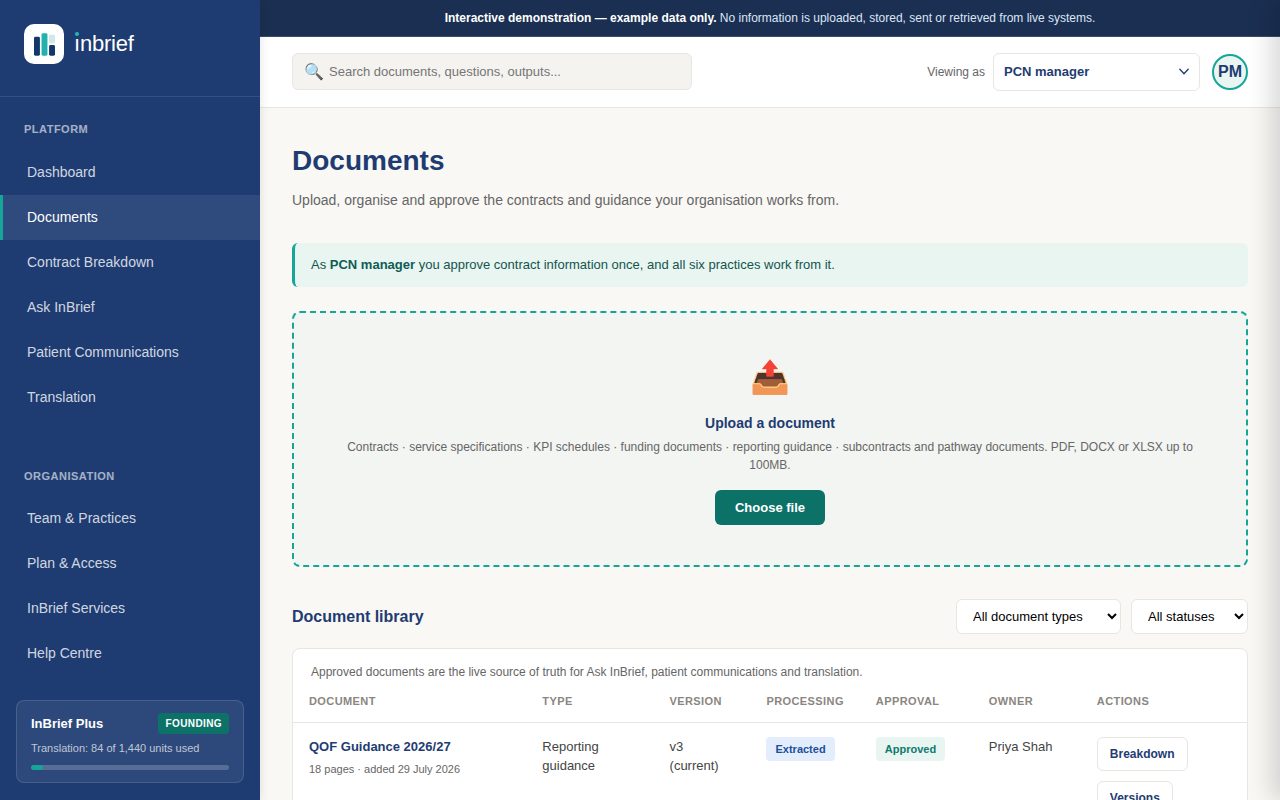
Upload
A contract, a service specification, or approved organisational information. It is read, segmented and checked before anything else happens.
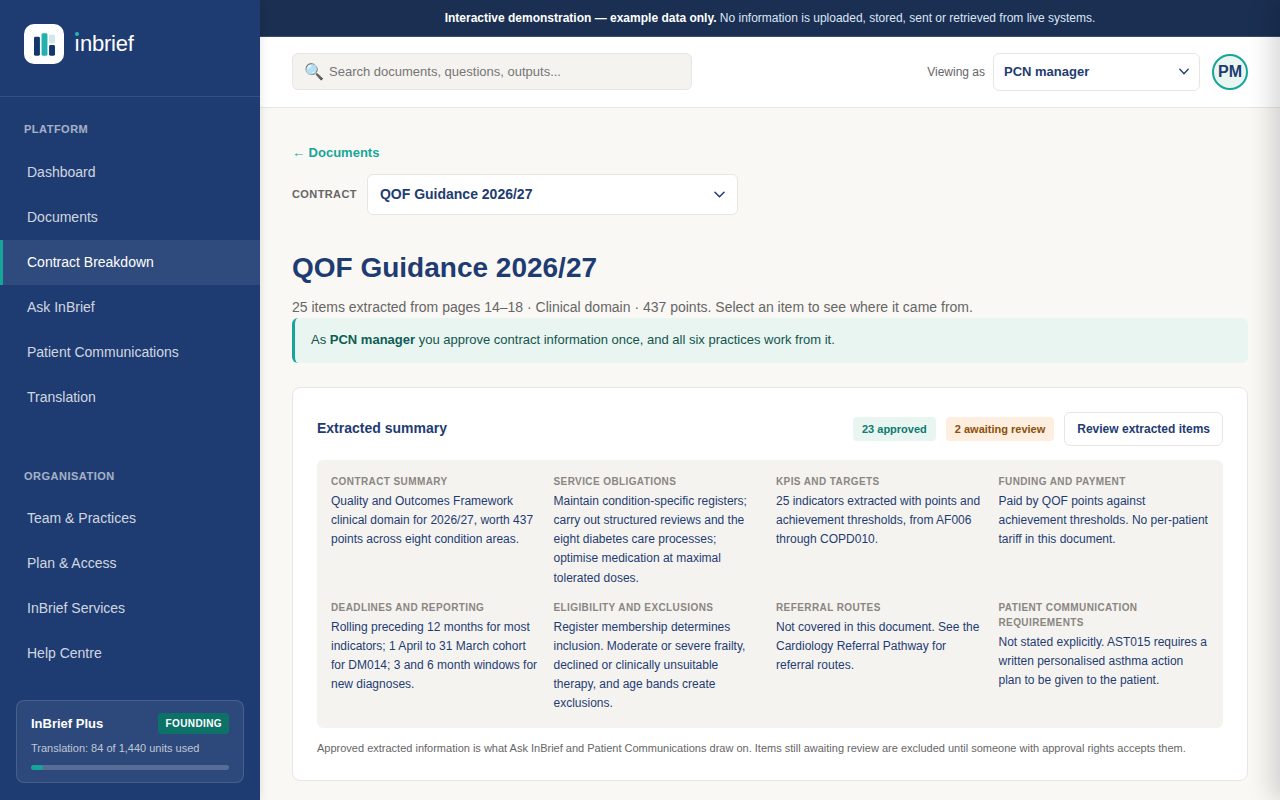
Review
Obligations, indicators, deadlines, eligibility rules and payment terms, each one linked to the passage it came from.
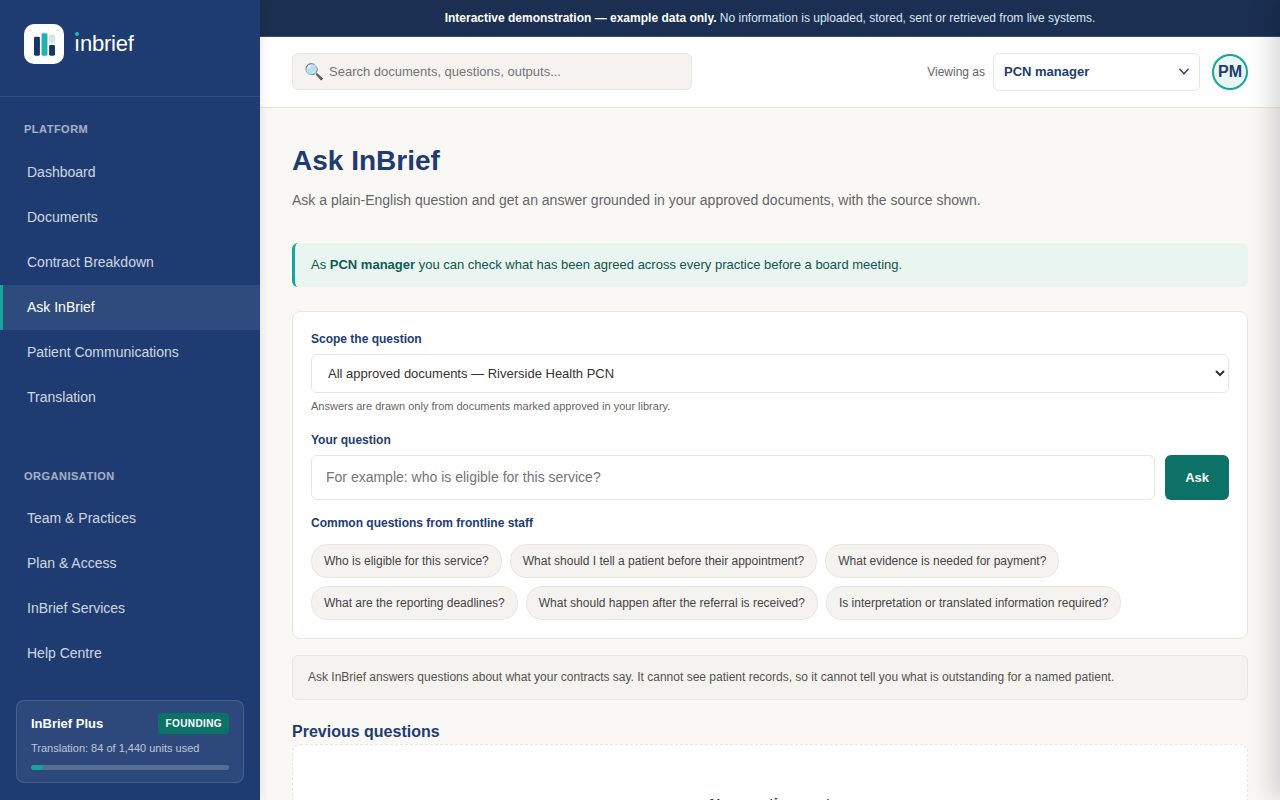
Approve
Approved items become what the organisation relies on. Anyone can then ask a question in plain English and see the source behind the answer.
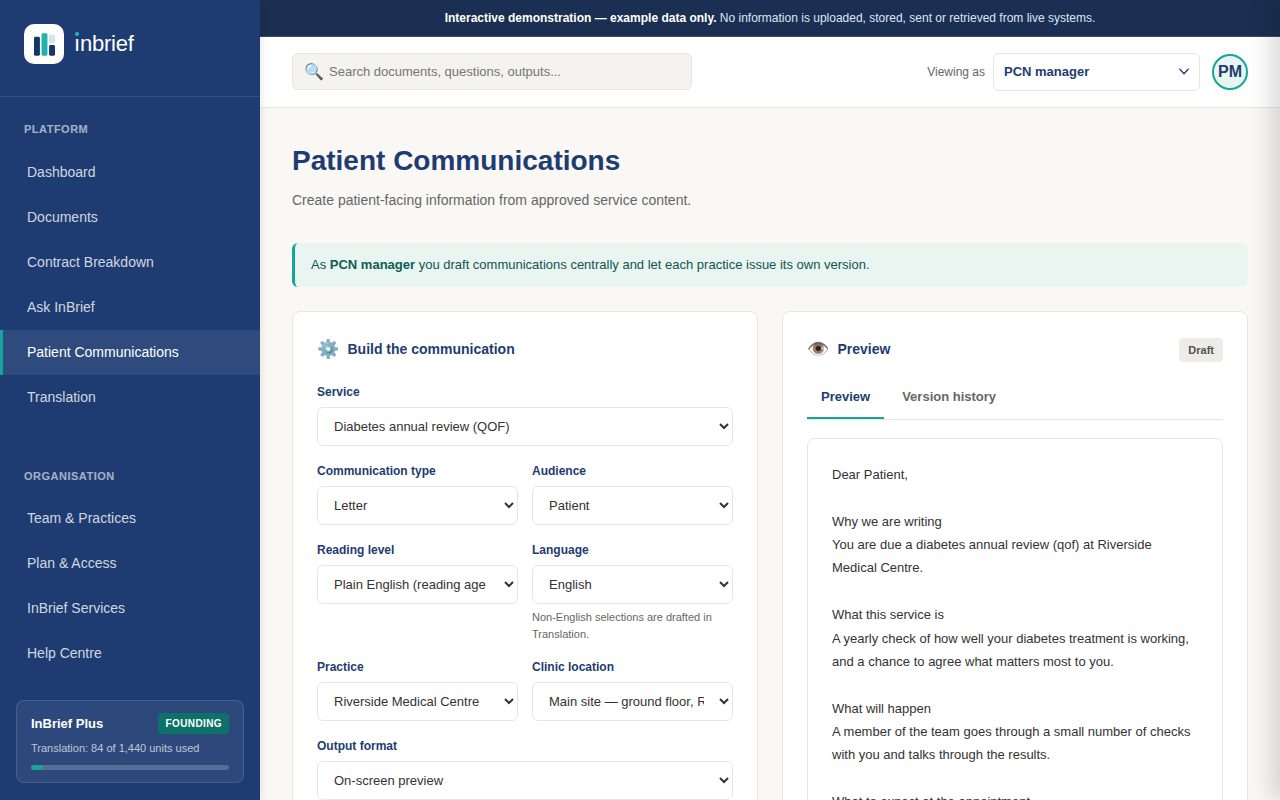
Use
Letters, texts and leaflets drafted from approved content at a chosen reading level, with your practice details already in them.
Four capabilities, all working from documents your organisation has approved.
Every line below is enforced in the software, not written for the website. The detail — data handling, tenant separation, audit, retention, model usage — is on the security page.
Not a policy — a refusal. Uploads are scanned and rejected if they look like they contain patient identifiers.
No diagnosis, no triage, no treatment recommendations. That boundary is what keeps InBrief outside the medical device regime.
An item that cannot be traced back to a passage is discarded. The database will not store one without a citation.
Nothing a patient would read gets there without someone with the right to approve it having done so, under their name.
Reviews, approvals and the audit log are append-only, enforced in the database rather than by convention.
Row-level security on every table holding customer content, forced, through a role that cannot bypass it.
HTTPS throughout, encryption at rest, and a delete that removes every version and the stored files — not just the index.
Your documents go to the model that reads them, and are not training data for us or for the model provider.
The whole product, with invented data, in its own tab. Nothing to install and nothing to sign up for.
The whole interface, at full size, in its own tab. Look through a contract breakdown, ask a question, draft a patient letter and translate one. No account, no sign-up, nothing to install.
Open the interactive demo (opens in a new tab)No information is uploaded, stored, sent or retrieved from live systems in the demonstration. The practices and contracts in it are invented.
InBrief is early, and we are not going to put invented quotes on this page. Until there are pilot customers willing to be named, here is what you can check for yourself instead.
The interactive demonstration is the real interface with invented data — not a slideshow, not a lead-capture form. Open it and look for what it cannot do.
Open the demoA demonstration takes half an hour and uses a specification you actually hold, so you see what it finds and what it misses rather than an example we chose.
Book oneTenant separation, audit, retention, deletion and model usage, written for the person assembling a DPIA rather than for a brochure.
Security and governance
Louis Williams founded InBrief after several years in NHS primary care operations and transformation — managing contracts, service specifications and performance across GP practices and PCNs. The problem was always the same: too much operational knowledge locked in long documents, or held by a handful of experienced people.
Per practice. Unlimited staff accounts on both plans, because charging per seat would keep the contract knowledge with the people who already have it.
Annual billing works out lower per month — Core is £66 a month rather than £79.
£790 per practice / year
£66 a month, billed annually
Recommended
£1,090 per practice / year
£91 a month, billed annually
Everything in Core, plus
All prices exclude VAT.
| Practices | Discount |
|---|---|
| 2 | 10% |
| 3 | 15% |
| 4 | 20% |
| 5 | 30% |
| 6 | 30% |
| 7 or more | Priced individually |
The pilot fee is credited against an annual subscription if you convert within 30 days of it ending.
Limited availability
A fixed cohort rather than a standing offer. When it is full it closes.
Delivered by people and quoted per engagement, for when a contract needs more than reading. The software works on its own.
Also expert consultation and advisory retainers. All quoted per engagement.
See all servicesThese are boundaries, not gaps waiting to be filled. Several of them are what keep InBrief outside the medical device regime. InBrief is not affiliated with or endorsed by the NHS.
The ones that decide whether a procurement conversation happens. Answered from what the software does, not from what would sell well.
No. It has no connection to EMIS, SystmOne or any clinical system, and no integration is planned that would give it one. It reads the documents you upload and nothing else.
No — and it tries not to let you. Every upload is scanned before it is processed, and one that appears to contain patient-identifiable data is rejected with the reason, rather than quietly accepted. Contracts and service specifications do not contain patient data, so this should never fire in normal use.
No. Your documents are sent to the model that reads them and are not used as training data by us or by the model provider.
Every extracted item carries a citation to the passage it came from, and the interface shows you that passage. An item the system cannot trace back to the document is discarded rather than displayed — the database will not store one without a source. Answers to questions are drawn from the approved documents and quote them.
Upload the new version against the same document. Previous versions stay readable, and each extraction stays attached to the version it was actually made from, so an item approved last year does not silently start claiming to describe this year's contract.
Separate organisations cannot see each other's documents at all — that is enforced in the database rather than in application code, so a query that forgot to filter would still return nothing. Within one organisation, staff share the document library, and what differs is what each role may do: extract, draft communications, approve translations, manage settings.
Yes. Eight roles, each with its own combination of four rights, enforced on the server rather than by hiding buttons. A receptionist can read the answers and cannot start an extraction or approve a communication.
PDFs, up to 32MB each. A scanned PDF with no text layer is detected and reported rather than silently producing nothing.
No. It drafts communications for a named person to approve, and there is no send route and no messaging gateway in the product — approved text leaves as an export, and whatever you already use to contact patients sends it.
A translation has to be approved by someone with the right to approve it before it can be used, and the approval is recorded against their name. Independent linguistic review by a qualified translator is available as a paid service where a communication warrants it.
Yes to both. Extracted items export to CSV, and deleting a document removes every version, its extractions and the stored files — which is what makes an erasure request actually erase something.
Ask us and we will answer precisely, in writing, for the arrangement you would actually be on. We would rather tell you than publish something that stops being true when the infrastructure changes.
A demonstration takes half an hour. A paid pilot runs twelve weeks and starts at £500, credited against an annual subscription if you convert.